Debug UI
VLSDK provides a Debug UI for checking the current state of VLSDK. With the Debug UI you can see how VLSDK is operating while testing in a mobile environment, without writing any additional code.
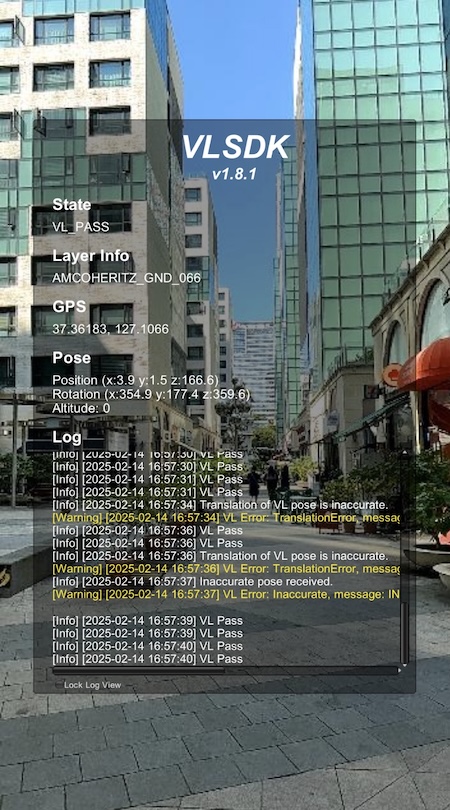
Information shown in the Debug UI
The Debug UI shows the following information.
- VLSDK version
- VLSDK state
- Recognized layer information (LayerInfo)
- Current GPS values
- Current pose information (Position, Rotation, Altitude)
- VLSDK operation logs
Enabling / disabling the Debug UI
- When the Debug UI is set up for use, tapping the screen three times quickly enables the Debug UI.
- When the Debug UI is enabled, tapping the screen three times quickly disables the Debug UI.
Setting up the Debug UI
The Debug UI can be used when the following two conditions are met.
-
Enable
Use Debug UIin theLogViewercomponent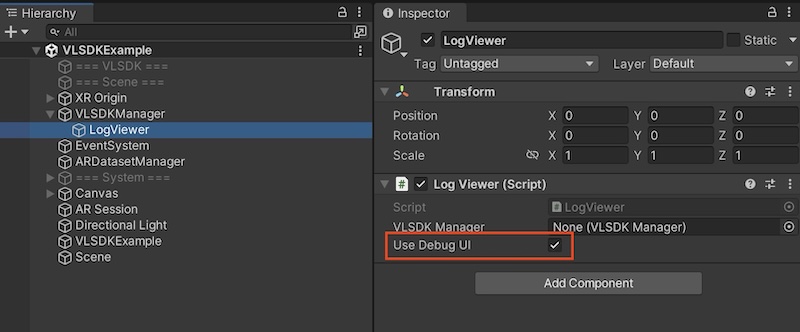
-
Build the app as a
Development Build
LogViewer is created automatically when you add VLSDKManager to the Scene.